
6 Differences Between MP3, AAC, and WAV in YouTube Conversions
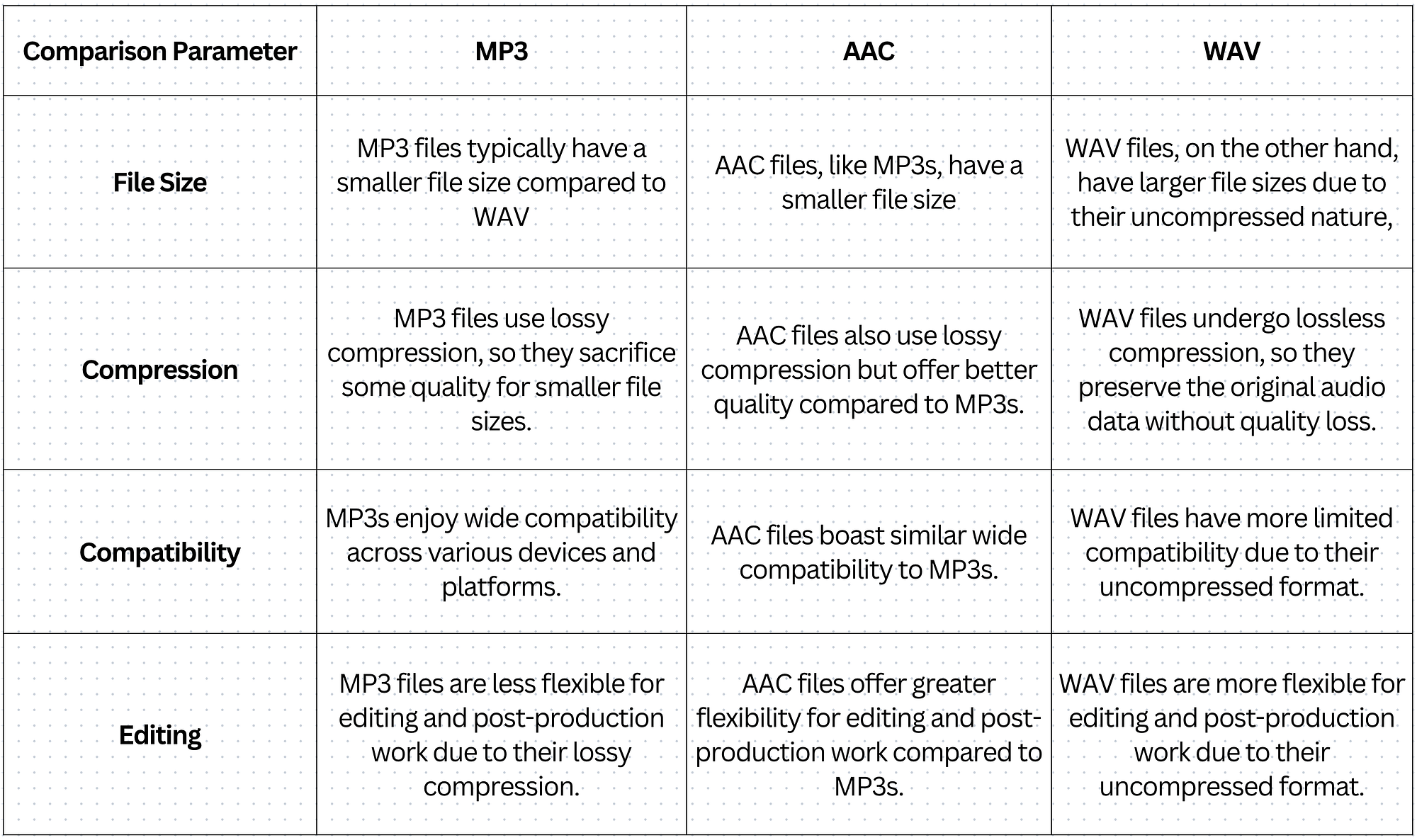
When it comes to converting YouTube videos to audio files, particularly through popular YouTube to Mp3 processes, understanding the differences between common audio formats like MP3, AAC, and WAV is crucial. YouTube primarily streams audio using AAC (in MP4 containers) or Opus (in WebM for higher efficiency), with bitrates typically capping at around 128-160 kbps for AAC and up to 160 kbps for Opus in standard videos. Converting these to offline formats involves trade-offs in quality, file size, compatibility, and more.
Many users opt for YouTube to Mp3 conversions to save music, podcasts, or lectures for offline listening. However, the output format significantly impacts the listening experience. MP3 remains the most popular choice due to its universal compatibility, but AAC and WAV offer distinct advantages and drawbacks. Below, we explore six key differences between MP3, AAC, and WAV, with a focus on how they perform in YouTube conversion scenarios.
1. Compression Type: Lossy vs. Lossless
The fundamental difference lies in how these formats handle audio data compression.
- WAV is an uncompressed, lossless format. It stores raw audio data without discarding any information, preserving every detail from the original recording. This makes WAV identical to the source in terms of fidelity.
- MP3 and AAC are both lossy formats. They use perceptual coding to remove sounds that are less audible to the human ear (such as frequencies masked by louder sounds), significantly reducing file size at the cost of some irreversible data loss.
In YouTube to Mp3 conversions, starting from YouTube’s already lossy AAC or Opus source means you’re dealing with second-generation compression. Converting directly to WAV would retain whatever quality is present in the YouTube stream without further degradation, but it won’t “restore” lost data. MP3 and AAC conversions add another layer of lossy encoding, potentially introducing minor artifacts, especially if the bitrate is lowered.
For audiophiles seeking maximum fidelity from YouTube audio, WAV avoids additional loss, but the source limitation (YouTube’s ~128-160 kbps) caps the overall quality regardless.
2. Audio Quality and Fidelity
Quality is subjective and depends on bitrate, but objective tests show clear hierarchies.
- WAV offers the highest possible quality because it’s lossless and uncompressed. It supports high sample rates (up to 192 kHz) and bit depths (up to 32-bit), capturing the full dynamic range and frequency response.
- AAC generally provides superior quality to MP3 at equivalent bitrates. Developed as an improvement over MP3, AAC uses more efficient algorithms, better handling transients (sudden sounds like drum hits) and high frequencies. At 128 kbps, AAC often sounds clearer and less “muddy” than MP3.
- MP3 is solid at higher bitrates (256-320 kbps) but can exhibit artifacts like pre-echo or high-frequency loss at lower rates.
YouTube’s audio is already compressed (mostly AAC at ~128 kbps), so converting to high-bitrate MP3 (e.g., 320 kbps) or AAC won’t improve it beyond the source—it may even slightly degrade it due to re-encoding. WAV preserves the YouTube stream’s quality exactly, making it ideal for archival purposes. However, blind tests show that even trained listeners struggle to distinguish 320 kbps MP3/AAC from WAV when the source is YouTube’s compressed audio.
3. File Size and Storage Efficiency
File size is a major factor for portable devices and large libraries.
- WAV files are massive. A typical 4-minute song in CD-quality WAV (44.1 kHz, 16-bit stereo) is around 40-50 MB, as it uses about 1,411 kbps uncompressed.
- MP3 and AAC are highly efficient. At 320 kbps, a similar song is ~10-12 MB for MP3, while AAC can achieve comparable quality in slightly smaller files (8-10 MB) due to better compression.
YouTube videos are already optimized for streaming with low bitrates, so converting to MP3 or AAC keeps files small (often 3-5 MB per song at 128-320 kbps). WAV conversions balloon sizes dramatically—up to 10x larger—making it impractical for downloading playlists or storing on mobile devices. For YouTube to Mp3 users with limited storage, MP3 strikes the best balance.
4. Compatibility and Device Support
Universal playback is essential for offline audio.
- MP3 is the king of compatibility. Virtually every device, player, car stereo, and software supports it natively, dating back to the 1990s.
- AAC is widely supported on modern devices (especially Apple ecosystem, Android, and streaming apps) but less universal on very old hardware.
- WAV has broad support in professional software and Windows/Mac players but can be finicky on portable devices or older systems due to large sizes and lack of metadata handling.
In YouTube to Mp3 workflows, MP3 ensures the file plays everywhere without issues. AAC is fine for iPhones or modern Androids, while WAV might require specific players and consumes more battery during playback due to larger transfers.
5. Bitrate Flexibility and Encoding Efficiency
Bitrate determines how much data is allocated per second, directly affecting quality and size.
- WAV has fixed high bitrates (e.g., 1,411 kbps for CD quality) with no options for reduction.
- AAC excels at lower bitrates (96-256 kbps), delivering transparent quality where MP3 might sound compressed. It supports up to 529 kbps per channel and higher sample rates (up to 96 kHz).
- MP3 tops out at 320 kbps and supports rates from 32-320 kbps, but efficiency drops at lower ends.
YouTube streams at modest bitrates, so re-encoding to 320 kbps MP3 adds unnecessary size without audible gains. AAC at 256 kbps often matches or exceeds MP3 320 kbps from the same source. WAV ignores bitrate choices entirely, always prioritizing maximum data.
6. Use Cases in YouTube Conversions: Practical Applications
Each format shines in different scenarios during YouTube to Mp3 or audio extraction.
- WAV is best for professional editing or archiving. If you’re extracting YouTube audio for remixing, podcast production, or critical listening on high-end systems, WAV avoids further quality loss and provides headroom for processing.
- AAC is optimal for modern streaming-like playback. Since YouTube uses AAC natively, converting to high-quality AAC (e.g., 256 kbps) minimizes generational loss and keeps files smaller than MP3 equivalents.
- MP3 dominates everyday portable use. Its small size, universal support, and sufficient quality at 320 kbps make it the go-to for building offline libraries from YouTube music or videos.
Ultimately, for most YouTube to Mp3 conversions, high-bitrate MP3 (320 kbps) offers the sweetest spot: excellent perceived quality, tiny files, and flawless compatibility. If storage isn’t a concern and you’re editing, choose WAV. For Apple users or efficiency, AAC is superior.
Conclusion: Choosing the Right Format for Your Needs
YouTube’s compressed audio sets a ceiling on quality, so no conversion format will make it “hi-fi.” However, understanding these differences helps optimize your downloads. MP3 remains the most practical for widespread YouTube to Mp3 use, balancing quality and convenience. AAC edges it out for slightly better efficiency on modern devices, while WAV is reserved for uncompressed purity when file size matters less.
Experiment with converters that allow format and bitrate selection to find what suits your ears and setup best. Whether you’re saving lectures, music, or ASMR, the right choice enhances your offline listening experience without unnecessary compromises.